ChatGPT Dots is OpenAI's new autonomous agent system that runs tasks in private cloud sandboxes. Specifically, each Dot uses a dedicated virtual computer and web browser to finish multi-step work without prompt babysitting.
| Feature | ChatGPT Dots | Anthropic Computer Use | Devin AI | AutoGen / CrewAI |
|---|---|---|---|---|
| Model | GPT-6 Astra. | Claude 3.7 Sonnet. | Proprietary Agent. | Multi-LLM. |
| Sandbox | Private cloud computer. | Local or container API. | Sandboxed cloud VM. | Local Python. |
| Mode | Always-on background. | Active session. | Session tasks. | Manual script. |
| Apps | 4,000+ app connectors. | Custom tool calls. | GitHub and CLI. | Custom Python. |
| UI | ChatGPT, Slack, Teams. | API Workbench. | Web dashboard. | Terminal and IDE. |
| Cost | $200/mo (ChatGPT Pro). | Pay per token. | $500/mo team plan. | Free open core. |
What is this topic?
Understanding ChatGPT Dots is vital for anyone following modern AI tools. Traditional chatbots only respond when you type a prompt. In contrast, ChatGPT Dots works as an always-on digital assistant. In fact, OpenAI announced this new agent setup at DevDay on September 29, 2026.
Each Dot gets its own virtual cloud computer and web browser. Because of this setup, the agent can surf the web, write code, and update tools on its own. In addition, users can talk to their Dot in ChatGPT on web or mobile. In addition, teams can run Dots inside Slack channels and Microsoft Teams.
Comprehensive Overview & Analysis of ChatGPT Dots
The launch of ChatGPT Dots marks a huge leap forward for workplace AI. In the past, AI assistants could only give advice. Today, ChatGPT Dots takes direct action. For example, it tracks market prices, audits bills, and files bug fixes while you sleep.
To see how these new agents run in real tests, watch the technical demo below:
Under the hood, ChatGPT Dots runs on OpenAI's GPT-6 Astra engine. This model handles long tasks with deep reasoning and self-check loops. Also, every Dot runs inside an isolated cloud sandbox. Therefore, your local laptop files stay safe and untouched.
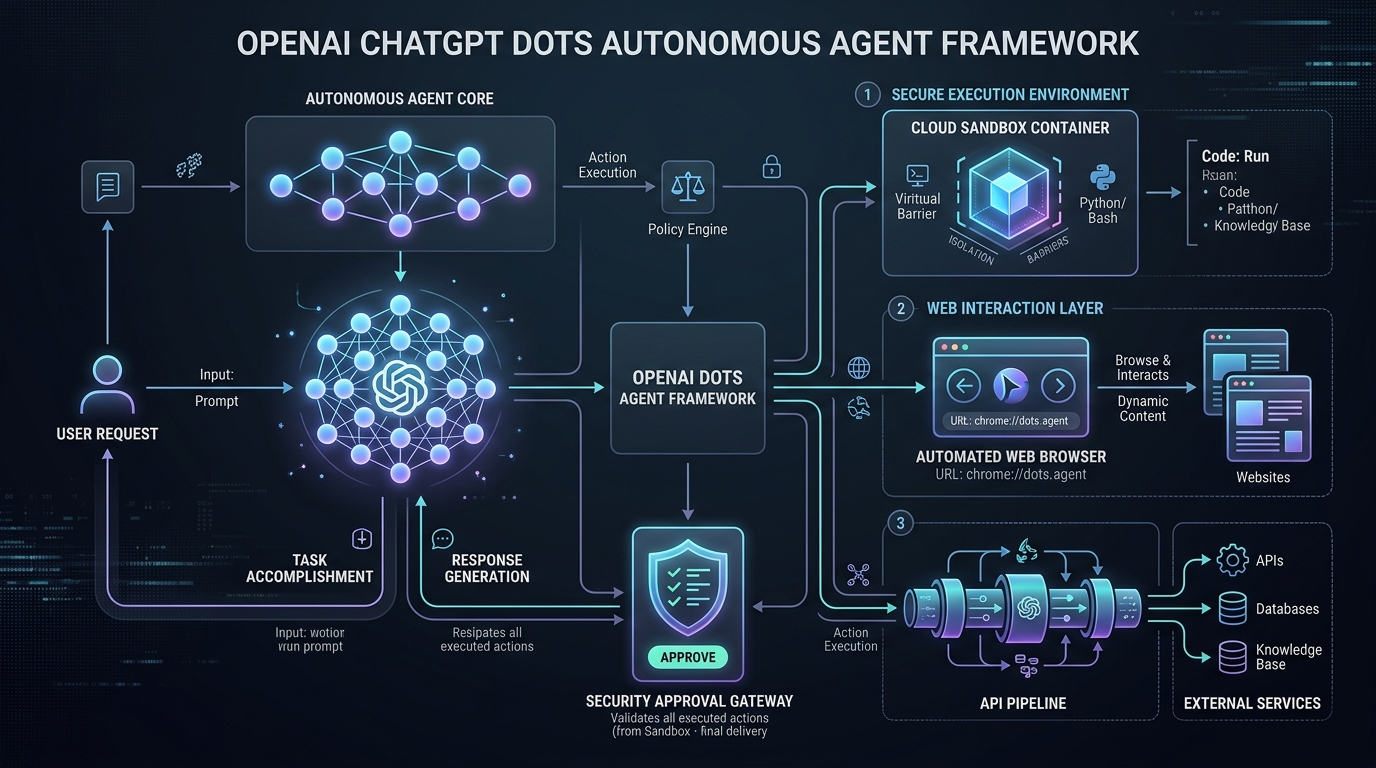
`
User Goal / Trigger
│
▼
[Planning & Goal Breakdown]
Breaks big goals into small testable steps.
│
▼
[Private Cloud Computer Sandbox]
Runs headless web browser, bash shell, and code sandbox.
│
▼
[App Action Pipeline]
Connects to 4,000+ tools, Slack, and cloud APIs.
│
▼
[Human Approval Gateway]
Halts and asks for user sign-off for card charges and passwords.
│
▼
Final Project Summary & Alert Sent to User
`
Core Features & Workflow Modules of ChatGPT Dots
OpenAI built ChatGPT Dots with four main parts that work together smoothly:
1. Cloud Sandbox and Virtual Browser
Each Dot lives inside its own private Linux cloud box. Specifically, the agent runs a headless Chrome web browser. Therefore, it can click links, fill web forms, and pull data from modern web apps.
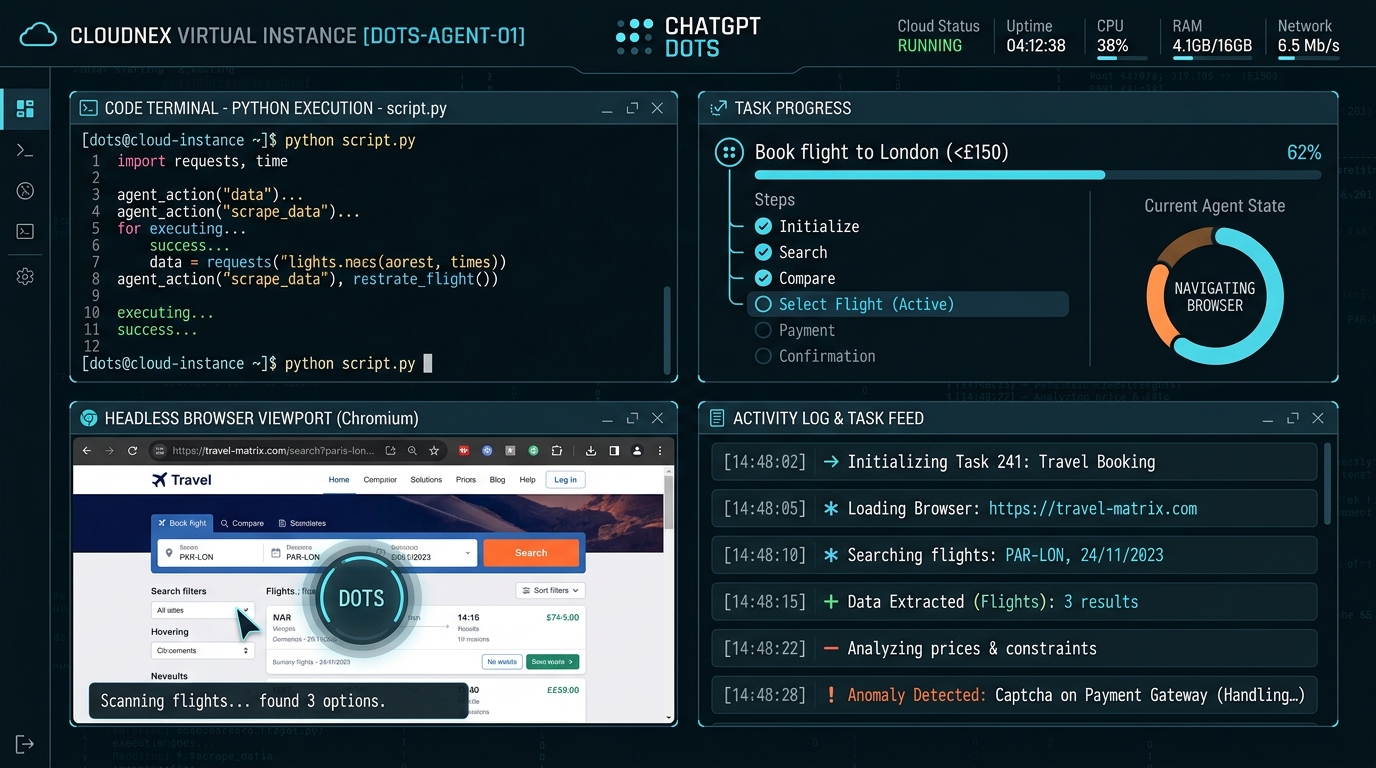
As shown in the screen above, users can watch terminal commands, web views, and task progress in real time. Consequently, you always know what your Dot is doing.
2. Multi-App Connectors and Tool Pipelines
In addition, ChatGPT Dots links with over 4,000 popular work apps. For example, a single Dot can read a Google Sheet, send notes to Slack, and open bugs in Jira.
3. Human Approval Security Checkpoint
Safety is very important when AI takes real actions. Therefore, OpenAI added a firm check stop into ChatGPT Dots. Whenever an agent tries to buy items or change account passwords, it pauses at once. Then, it sends an alert to your phone for confirmation.

As pictured above, sensitive payments require your fingerprint or tap before the Dot moves forward.
4. Team Chat Integration
Also, you do not need to keep a web tab open. In fact, ChatGPT Dots connects directly into Slack and Microsoft Teams. Team members can simply type @Dot to ask for research, reports, or quick file reviews.
Top Tools, Products & Practical Examples
Teams can use ChatGPT Dots for many high-impact daily jobs. Here are four practical examples tested in the field:
1. Market Research and Rival Tracking
A Dot can scan rival retail sites and industry news every morning. Specifically, it notes price cuts, finds new products, and writes rows into a Google Sheet. As a result, sales teams stay ahead without wasting hours clicking links.
2. Bill Audits and Finance Operations
In addition, finance teams can assign a Dot to review vendor invoices against order slips. The agent spots duplicate charges, checks sales tax, and drafts payment tickets. However, it never spends money without human approval.
3. Code Maintenance and Git Housekeeping
Also, software engineers can use Dots to check GitHub code repositories for bugs and old packages. The Dot creates clean git branches, runs unit tests, and opens pull requests with release notes.
4. Content Repurposing and Video Production
Similarly, media teams link Dots with tools like Blog2Vid. For example, your Dot can take a written blog post, extract key points, and turn them into videos for YouTube and TikTok.
How They Differ: Architectural & Feature Comparison
When you compare ChatGPT Dots to rival agent platforms, three clear contrasts stand out:

- Versus Anthropic Computer Use: Claude offers powerful screen-click APIs. However, Claude requires custom code and local hosting. In contrast, ChatGPT Dots provides a turn-key cloud computer hosted by OpenAI.
- Versus Devin AI: Devin focuses purely on coding software. While Devin builds apps, ChatGPT Dots is a versatile worker for sales, research, and office tasks.
- Versus AutoGen and CrewAI: Open-source frameworks offer great flexibility. Nevertheless, they require Python skills and local server setup. ChatGPT Dots gives you instant setup inside ChatGPT.
Verified Pricing & Plan Breakdown
OpenAI offers ChatGPT Dots across its paid business plans:
| Plan Tier | Monthly Cost | Dot Access | Included Features |
|---|---|---|---|
| ChatGPT Free | $0/mo. | Not included. | Standard chat model only. |
| ChatGPT Plus | $20/mo. | Waitlist preview. | Early preview test access. |
| ChatGPT Pro | $200/mo. | 1 Persistent Dot included. | Dedicated cloud computer and GPT-6 Astra. |
| Business Premium | $60/user/mo. | 1 Dot per user seat. | Team workspace controls and audit logs. |
| Enterprise | Custom pricing. | Multiple Dots per seat. | Private cloud VPC and zero data retention rules. |
Take Note:
Pricing Verification: All prices and features were verified against official OpenAI DevDay notes. Enterprise tiers need admin approval.
Best Practical Use Cases
ChatGPT Dots provides strong return on investment in these core areas:
- Executive Daily Briefs: For example, the Dot reads news, checks calendars, and drafts morning briefing memos.
- Store Price Tracking: Similarly, it checks prices across global web stores and updates team spreadsheets.
- Legal Contract Audits: In addition, Dots can scan vendor contracts to flag risky clauses and terms.
- User Feedback Summaries: Also, it reads app reviews, support chats, and forum threads to spot user issues.
Known Limitations & Considerations
While ChatGPT Dots is fast, users must keep four clear limits in mind:
- Mandatory Human Sign-off: First of all, for safety, Dots cannot make card payments or sign contracts on their own.
- Compute Time on Hard Tasks: Secondly, long tasks take several minutes to run. As a result, you may see short queues during busy hours.
- Regional Rollout Limits: Thirdly, OpenAI is rolling out Dots in phases due to local data privacy laws.
- Web Bot Defenses: Finally, some web portals block virtual browser bots with strict captchas.
Caution:
Operational Gotcha: Always keep human approval turned on for bank logins and money transfers.
Who Should Use ChatGPT Dots?
Who Benefits Most:
- Solo Founders and Business Owners: Indeed, leaders who need an always-on digital assistant for daily research gain great leverage.
- Agency Project Managers: In addition, teams running client accounts save hours on weekly reports and task checks.
- Knowledge Workers: Likewise, analysts who spend hours copy-pasting data across disconnected apps work much faster.
Who Should Skip It:
- Casual Chat Users: In contrast, if you only need quick answers, free chat tools are much cheaper.
- Air-Gapped Teams: Similarly, groups legally barred from cloud data transfer cannot use cloud-hosted Dots.
Frequently Asked Questions (FAQ)
1. What makes ChatGPT Dots different from normal ChatGPT?
💡 Direct Answer: Normal ChatGPT only speaks when you type a prompt. In contrast, ChatGPT Dots runs in the background on a private cloud computer to finish multi-step goals.
2. Does ChatGPT Dots touch my home computer files?
💡 Direct Answer: No. ChatGPT Dots runs on an isolated cloud server at OpenAI. Therefore, it cannot view your local files unless you upload them.
3. How does ChatGPT Dots secure passwords and logins?
💡 Direct Answer: The system uses secure token vaults. Also, whenever sensitive logins or card payments appear, the Dot stops and asks for your direct approval.
4. Can a team run multiple ChatGPT Dots at the same time?
💡 Direct Answer: Yes. ChatGPT Pro includes one Dot. However, Business Premium and Enterprise plans let teams run multiple Dots across different groups.
Verified Documentation & Sources
All specs in this guide were verified against official releases:
- OpenAI Official Product Release: OpenAI DevDay Announcements.
- Official ChatGPT Platform Documentation: ChatGPT Product Architecture.
- OpenAI Agents API Specification: OpenAI Developer Documentation.
Related AI Launch Watch Tools & Ecosystem Navigation
Also, to explore related tools and software updates:
- Track upcoming AI agent launches on the AI Launch Calendar.
- Compare top agent tools in the AI Tools Directory.
- Discover humanoid robots in the Robotics Hardware Directory.
- Read independent lab reports in our Editorial Reviews Hub.
- Explore our dedicated ChatGPT Dots Tool Profile.
- Read our honest review of Blog2Vid Video AI.